
Watch: Pulse Lab Demo
See how analysts work in practice
Most real estate platforms stop at search: filters, lists, comps, and basic property cards. PropertyPulse is built around a different premise:
Finding the deal is not the hard part. Understanding the deal is.
And "understanding" means answering the questions that determine whether you should pursue a property at all:
- 1What's true about this asset beyond the listing description?
- 2What risks can kill the deal (or delay it by 6–18 months)?
- 3What's the highest-probability strategy: buy and hold, conversion, add floor area, assemble, reposition, or pass?
- 4What needs to be verified before bidding or making an offer?
- 5What is the next best action—today—so you don't lose the opportunity?
That is the reason Pulse Lab exists.
What is an "Analyst" in PropertyPulse?
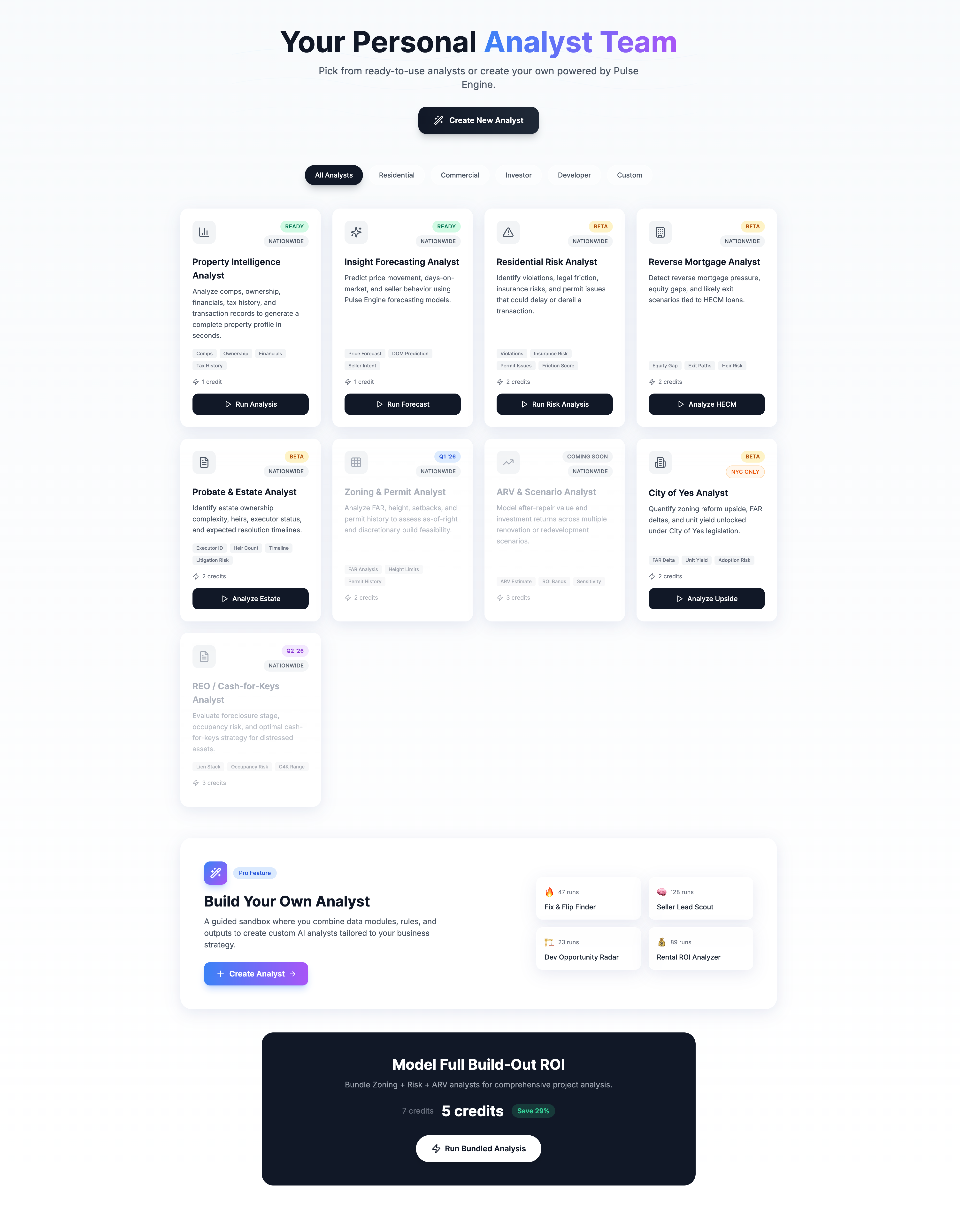
Pulse Lab is where you run Analysts—repeatable, specialized research workflows that convert raw data into deal-ready conclusions. Some Analysts are prebuilt (ready to run). Others are custom (you build them to match your exact strategy).
In PropertyPulse, an Analyst is a structured decision workflow:
It behaves like a specialized research operator that you can run on any property (or an entire list of properties) to answer a specific question.
Example (plain English)
Instead of "show me 3-family homes in Brooklyn," an Analyst answers:
- "Which of these 3-family properties is actually safe to bid on this week?"
- "Which ones have hidden violations, landmark constraints, or flood exposure that will change the renovation plan?"
- "Which ones have unused development potential worth modeling before we price the offer?"
Key Distinction:
Filters help you find candidates.
Analysts help you decide.
Why Pulse Lab exists: filters aren't enough
Most investors, developers, and operators already know the pain:
- 1You find a promising listing.
- 2You spend hours pulling permits, violations, zoning context, and constraints.
- 3You realize late that the "deal" is not a deal—because you missed one blocking issue.
A platform that only helps you find addresses is not a decision system.
Pulse Lab is the layer that turns PropertyPulse into an operational advantage, because it:
Standardizes research
Your team runs the same logic every time
Reduces guesswork
The system flags what matters
Speeds up bidding
Fewer unknowns at offer time
Creates institutional memory
What you learned becomes reusable logic
Pulse Lab vs Filters vs Reports vs CRM
To make this concrete, here's the clean separation:
| Layer | Goal | Output |
|---|---|---|
| Pulse Filters | Narrow the universe | Candidate properties |
| Reports / Property cards | Display data | Details and snapshots |
| CRM | Track contacts & tasks | Pipeline visibility |
| Pulse Lab | Produce a recommendation | Conclusion, verification checklist, strategy direction |
Pulse Lab is not a prettier report. It's the part of the system that answers:
"What should I do next, and why?"
Analysts as Modular Decision Engines
Every Analyst is assembled from building blocks you can understand:
1Inputs
What the Analyst needs to operate:
- Address (or BBL/BIN/APN)
- Property facts (class, size, year built, units)
- Regulatory context (zoning, overlays, historic)
- Risk signals (violations, permits, flood)
- Market context (comps, rents, absorption)
2Logic
The decision rules:
- Scoring (risk, readiness, opportunity)
- Gating (blocking vs warning issues)
- Prioritization (what to check first)
- Scenario selection (most realistic strategy)
3Outputs
What a user gets back:
- A concise decision summary
- Flags (blocking / warning / informational)
- Quantified deltas (e.g., unused FAR)
- Action checklist with prioritization
∞Analysts Scale
Run once, use everywhere:
- A single address
- A portfolio
- A weekly pipeline of listings
- A market-wide search result set
Prebuilt Analysts: ready-to-run playbooks
Pulse Lab ships with prebuilt Analysts so users can get value immediately. The prebuilt set evolves, but they typically fall into categories like:
Property Intelligence Analyst
Ownership, transactions, baseline facts
Insight Forecasting Analyst
Predictive signals and timing insights
Zoning & Permit Analyst
Zoning envelope, constraints, permit posture
Risk Analyst
Red flags that can derail the deal
Reverse Mortgage Analyst
Equity/exit risk and resolution paths
Probate & Estate Analyst
Complexity and process posture
City of Yes Analyst
Regulatory upside modeling (NYC)
REO / Cash-for-Keys Analyst
Foreclosure stage and C4K strategy
These are "analyst-shaped" experiences: you click Run, and you get a decision-ready output—without building anything.
The Risk Analyst: the fastest way to uncover the truth
If you are bidding on an asset, the biggest threat is not "missing a deal."
It's buying a problem you didn't price.
The Risk Analyst exists to answer one question:
"What can block, delay, or materially change my plan?"
What Risk Analyst flags
Typical categories include:
Open Violations
DOB/HPD violations that require remediation before closing or development
Compliance Constraints
Landmark review requirements that add timeline and approval uncertainty
Active Permits
Signals that work is underway or unresolved—affects scope and pricing
Flood Exposure
Insurance, design constraints, and lender posture implications
Environmental Designations
E-designations and other site constraints that may affect development
Why this changes outcomes
The Risk Analyst does two things that are difficult to replicate manually at speed:
- It distinguishes "blocking" vs "warning" issues
- Blocking = you likely cannot proceed on your intended timeline/strategy without remediation or approvals
- Warning = proceed, but price/time assumptions should change
- It turns flags into a verification plan
Not "here's a list of problems," but:- what to verify first
- what documents or evidence you need
- what tradeoffs and timeline impact to assume until verified
This is how you move from "research" to "bid-ready conviction."
Pulse Lab for active listings: "offers sight unseen"
In the real world, listings often include language like:
- "Seller cannot guarantee access."
- "Offers may be made sight unseen."
- Minimal disclosures, limited interior confirmation.
That's not rare—it's common.
When access is uncertain, the only rational approach is:
- Verify what you can from records and external signals
- Map constraints
- Quantify upside where possible
- Decide whether to pursue deeper diligence—or walk away
Pulse Lab is built for that workflow because it gives you a repeatable path to uncover the truth before you emotionally anchor to the listing narrative.
Related Reading
For a detailed checklist approach to sight-unseen offers, see:
Sight-Unseen Listings: The Pre-Offer Risk Checklist (NYC)Custom Analysts: where users build their competitive edge
Prebuilt Analysts are strong defaults.
Custom Analysts are where serious operators win.
A custom Analyst is how a user encodes their strategy into a reusable workflow. Every serious buyer has a thesis:
- "I only buy properties where I can add unit count."
- "I only pursue assets where I can stabilize within 12 months."
- "I want high-violation distress situations because I can resolve them faster than competitors."
- "I want rezoning or policy-driven upside in a specific corridor."
- "I want assets where I can do a conversion, but only if the approvals risk is bounded."
Those are not generic filters. They are decision systems.
What users typically configure in a custom Analyst:
AScope
- Geography (borough/zip/neighborhood)
- Property types (multifamily, mixed-use, etc.)
- Minimums (lot size, floor area, unit count)
BGating Rules
- Exclude landmark/historic (or flag it)
- Exclude certain overlays
- Block on compliance conditions
- Require verified ownership patterns
COpportunity Logic
- Unused development potential thresholds
- Conversion feasibility (where applicable)
- Distress indicators (violations, liens)
- Time-to-resolution assumptions
DOutputs
- Shortlist ranking (top 10)
- One-page decision brief per property
- Action checklist (who does what next)
This is how Pulse Lab becomes "your personal analyst team"—not a generic dashboard.
Pulse Lab's most important product principle
It produces decisions, not data.
A high-quality Analyst output is structured like an investment memo:
Summary
What it is
- Property snapshot
- What the system believes is true
Key Findings
Why it matters
- Top upside signals
- Top constraints and risks
Recommendation
What to do
- Pursue / deprioritize / pass
- Recommended strategy path
Verification Checklist
What to confirm next
- Prioritized steps
- What would change the conclusion
This format is what makes Pulse Lab useful to multiple stakeholders:
- Acquisitions
- Development
- Operations
- Brokers
- Investment committee
Everyone can read the same output and understand the rationale.
Where Pulse Lab fits in your product ecosystem
Pulse Lab is the "decision layer," but it doesn't live alone. It connects naturally to other PropertyPulse components:
Discovery + Intake
Analyze + Decide
Dialer + Workflows
Find → Analyze → Decide → Execute
Pulse Lab is the part that ensures "Analyze" and "Decide" are not ad hoc.
Positioning (one sentence that lands)
Pulse Lab lets you run prebuilt or custom Analysts that turn property data into deal-ready decisions—risk flags, upside calculations, and next-step checklists—so you can bid with conviction.
Frequently Asked Questions
Is Pulse Lab for agents or investors?
Both. The difference is what they optimize for: agents use it for faster listing/lead qualification and advisory confidence; investors/developers use it for feasibility, risk posture, and strategy selection.
Is this replacing due diligence?
Pulse Lab is best framed as pre-diligence and diligence acceleration: it reduces unknowns early, and structures what must be verified next. It does not replace professional inspections, legal review, or title work.
Where does zoning fit?
Zoning context comes from authoritative zoning sources and mapping tools. In NYC, ZOLA and zoning resolution references are central for many workflows. Pulse Lab Analysts can incorporate zoning constraints as gating rules.
Where does 'reverse mortgage' fit?
For the reverse mortgage workflow, HUD's HECM program is the underlying structure that many market participants rely on. The Reverse Mortgage Analyst helps identify equity gaps, exit scenarios, and likely resolution paths.
Can I run an Analyst on multiple properties at once?
Yes. Analysts scale across a single address, a portfolio, a weekly pipeline of listings, or a market-wide search result set. This is how teams operationalize their research process.
How do custom Analysts differ from prebuilt ones?
Prebuilt Analysts are ready-to-run playbooks for common workflows. Custom Analysts let you encode your specific investment thesis, gating rules, and output preferences into a reusable workflow that your entire team can run.
The Real Takeaway
Pulse Lab is not a feature page. It is a product category decision.
PropertyPulse is positioning itself as an operational system where the user is not just searching addresses—but running repeatable research logic that produces decisions, rankings, and execution steps.
That is the difference between:
- a database you browse, and
- a decision engine you operate.
Ready to run your first Analyst?
Start with a prebuilt Risk Analyst or Property Intelligence Analyst—get deal-ready output in under 60 seconds.
Open Pulse Lab